
What is the Power Platform?
Microsoft Power Platform is a suite of low-code tools - Power Apps, Power Automate, Power BI, Power Pages and Power Pages - that let anyone build apps, automate workflows, and turn data into insights, without needing to write code or wait on IT.
If you have a Microsoft Office license, you may find that you have access to these tools. Have a look at https://m365.cloud.microsoft/
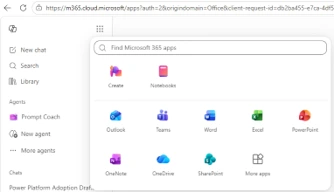
And then go to “All apps” again.
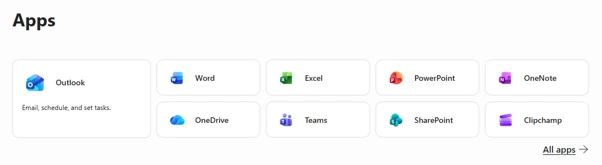
There you will see all the apps available to you. If you have the right license, you should be able to see Power Automate, Power Apps, Power Pages in there. Power BI and Copilot Studio are also considered part of the Power Platform, however these tools fall under a separate license, so may not be accessible to you.
But what do these tools do? And which ones could be useful to you?
Power Automate
Power automate allows you to automate your work. This can go from a simple flow to remind yourself to complete your timesheet, to complex flows that manage entire business processes.
Power Automate uses triggers, to start a flow, and actions. The actions are tasks that you can perform for a specific connector. For example, SharePoint is a connector. One of the triggers for SharePoint is: “When a new file is uploaded”. One of the actions is: “Get file properties”. Outlook is another connector. There an example of a trigger is: “When a new email arrives” and an action is: “Send an email”.
In addition Power Automate also has “Control Actions”. These are actions that allow you to control the next steps of your flow: for example with a condition.
If you want to know if Power Automate is useful to you, make a list of the following tasks:
- Repetitive tasks: for example, saving files to SharePoint
- Tasks you are prone to forget: for example, switching on your Out of Office
- Tasks that you simply don’t enjoy that much
- Any tasks you have that may require an approval from someone else
For each of the tasks you’ve listed, examine how much time those tasks cost you and multiply that by the number of times you have to perform that task. That should give you an indication of which task are worth automating.
In the next step, we recommend that you examine the complexity of the task. Start by making a drawing, if you are familiar with BPMN notation, you can create a BPMN diagram, or simply use paper and pencil to draw out the entire process. The more complicated it is to make your drawing, the more complicated it will be to build the flow.
If you are new to Power Automate, we recommend starting with automations that have very low complexity, over tasks that have a high automation value and high complexity.
Power Apps
Power Apps is the next tool, or rather toolbox, that allows you to create low-code applications. There are two different types of Power Apps: Canvas Apps and Model-driven apps.
Often IT managers have a fear of allowing business users to build applications: “Access all over again”. As if all those Access databases have magically disappeared. They’re still there. Shared via OneDrive.
Necessity is the mother of invention and whenever there is a need, there is always someone in the team just tech savy enough to Macgyver something together. The architecture may be questionable, the creativity endless. The solution: Mostly Excel.
Is it efficient? Probably not, but hey, it’s not shadow IT!
If you have processes that are managed 50% in Outlook, 40% in 3 different Excel files and 10% in Linda’s brain, you may want to look at replacing that process with an app, especially if you want to start using AI.
We do not recommend building Power Apps without the knowledge of IT.
Model-driven Apps
Model-driven Apps are data-driven applications. They’re a bit like Access in the sense that you are working with tables and on those tables you can create Forms that allow users to enter data, and views, that allow users to look at the data.
Some examples of model-driven apps
- Replacement of old Access Databases used to store data
- Inspection apps
- Contact Management apps
- Recruitement management apps
- Audit management apps
- Yearly budget
Canvas Apps
With Canvas Apps, you start off with a blank page and add components, for example a button, to that page. You then use PowerFx formulas to make that button do something. It’s a bit like a combination of PowerPoint and Excel. Canvas Apps are without a doubt the most fun to create, but more difficult to maintain than model-driven apps.
In our view, modelCanvas apps are great when:
- You want a user-friendly interface
- Your data already lives somewhere (not SharePoint or Excel) and you’d like it to stay there
- You want to be able to store data in the browser before committing it to your datasource
Some examples of use cases:
- Timesheeting apps
Any kind of registration solution
- Course Registration
- Visitor Management
- …
- Expense Claim app (Add AI builder functionality to read receipts.
Power Bi
Power BI forms a bridge between the Power Platform and Microsoft Fabric. Many people will be familiar with Power BI’s reporting and dashboarding capabilities. However, the real value sits behind the dashboard. Power BI allows business uses to extract data from various data sources without the need for code.
Power BI is also built on different modules. There is Power BI desktop, which is free, and allows you create your semantic model by combining various data sources together. Once you’ve imported all the data, you can publish your semantic model, and report, to the Power BI Service (which is not free). From there everyone who has access to the semantic model can use it to analyse their data.
The advantage that Power BI has over all other Business Intelligence tools is its integration with Excel, once a semantic model is published to a workspace a user has access to, they can access that data directly from Excel.
If you have one of those excel files that is connected to 5 other excel files, and half of the time, your connection to those files breaks, it’s time to look at Power BI.
A second advantage is the integration with SharePoint. If you want to save an export of data to SharePoint each month, simply subscribe to the service.
And finally, there is PowerPoint. If you need to present data at your weekly status meeting, simply create a Power BI report once, publish it and refresh it from PowerPoint before your meeting.
Some other use cases beyond the obvious dashboard:
- Replace Access databases that extract data from other sources
- You need a list of data from 2 or more different datasources and you want that data updated frequently.
Power Pages
Power Pages allows you to create external-facing websites that can be used by customers, suppliers or other people outside your organisation. With Power Pages people outside of our organisation can submit requests, update their details or view information that is stored in Dataverse.
Although Power Pages is marketed as low-code, it is probably one of the less accessible Power Platform tools for the average business user. Building a basic page is relatively easy, but once you start working with Dataverse, authentication, permissions and external users, the complexity increases quickly. For anything beyond a simple website, you will often need someone with more technical Power Platform or web-development experience.
Power Pages may be worth considering if:
- You need to give customers, suppliers or partners access to a business process.
- External users need to submit or update information.
- You want to replace email-based forms or requests with a self-service portal.
For most business users, Power Pages will probably be less relevant than Power Automate, Power Apps or Power BI. However, when you specifically need to expose a Power Platform solution to people outside your organisation, it can be a very useful tool.
Written by Karolien De Nil.